Add Animated Fancy Navigation Menu with Jquery to Blogger / Blogspot
Animated Fancy Navigation Menu with Jquery for Blogger. Every One has trying to add a beautiful menu with animation effect by jquery to their Blogger Blogs. But it has very difficult to add a menu to blogger blogs. here is Way2Blogging has make it as simple and is like 1, 2, 3…
This menu is designed by Sohtanaka
Features:-
- Simple and Easy to Installation
- Nice Animation Effect and awesome look
- Easy to add Links and use.
Watch Live Demo:-
How to Install?
- Go to Blogger Dashboard > Design tab.
- Click on Add a Gadget any where in your Layout.
- Choose LinkList Gadget and Leave Title Field as Blank
- Try to Add Some Links and Save Gadget
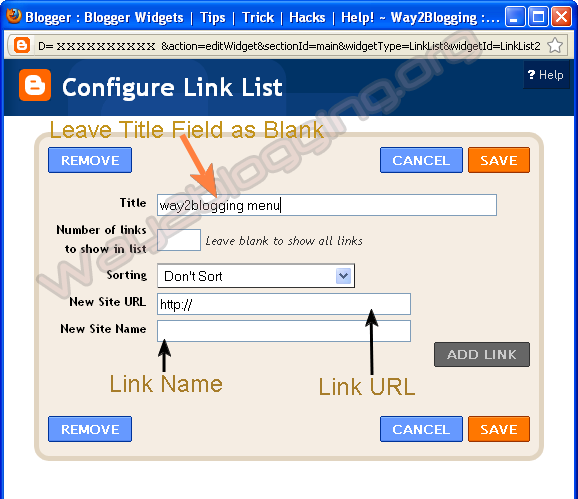
- Edit LinkList Widget Once again, And Copy Widget ID From URL like in Image
Make Sure the ID may Exact to match in the URL even a Block Letters(Capital Letters) Also for Perfect Working of This Widget!

http://www.blogger.com/rearrange?blogID=xxxxxx&action=editWidget&
sectionId=xxxx&widgetType=LinkList&widgetId=LinkList2
Here is
LinkList2is the widget ID in this URL - Use the below Button and Generate your Widget Code then Paste it before
</head>tag in your template.
Generate Widget Code - Save your template, You are Done!.
Put your Comments and Feelings About this Method of installation and about this Widget, So that i can implement more widgets and menu’s through this way! and also, share this Article with your Friends or to your Network :).

it is just mind blowing boss
thanx a lot
you really gave me a great thing i was searching from a long
@आननà¥â€à¤¦ पाणà¥â€à¤¡à¥‡à¤¯
You are Welcome!
Pls… Spread it if you like
very nice …thanks ..you are doing something different and very useful tricks ..keep it ….:)
thank you for this one. perfect tweak!
I've seen it in some WORDPRESS blog and thought how to add this in my BLOGGER blog…..
Dude, your comment section looks awesome! Can you share how you made it?
@Ayush
thanks for your comment
i made so many changes in it, so it looks unique and is very difficult to make like that, i mean just like 1,2,3… steps (of-course all my widgets and tutorials are 1,2,3… )
i will look forward to share the different style and is 1,2,3… type
Thank you for seeing here!
i have a question?
when edit this widget
i cant find id
http://draft.blogger.com/rearrange?blogID=***********72§ionId=sidebar&action=editWidget&widgetType=LinkList&referrer=directory
But spiceupyourblog also have the same comment section! You have to tell us how you did it!
@StarArchives.net
i checked once again
it must have Widget Id,
here is the url grabbed from my test blog
http://xxxxxxxxxxx.blogspot.com/undefined&action=editWidget§ionId=sidebar1&widgetType=null&widgetId=LinkList2
@Ayush
he personally asked me to want that type of comments section on his grate blog.
I wasn't aware of this,I have seen this function but i didn't implement it, will make sure to implement it and add navigation to my blog. magento themes
nice boss ….i like this trick
Its RoCkInG TuToRiAl
my first time visiting this blog, as a whole after I read some articles quite interesting to read
It's really awesome
-PAUL SANTOSH
I love it just the way it is…
Check out what came out in my blog: http://grxmccs.blospot.com
sir in my website i have already added a navigation menu, but after doing as above said, there is no change in it, n i dont even know whether there is any jquery or not
n also the new animated navigation menu is coming below in the last
please can u tell what should i do?
good morning, i just wanna ask, how can i create a drop down menu? can you show me how to do that?
Where do i post that Widget ID/Url
@Parbat
Put the Widget ID in Code Generator form and get your Code
Follow the Instructions listed in the Post.
is there a way to bold the text in the bar?
thank….
great work man!!!!
http://sanship.co.cc
How can I change color, I need blue instead of red. See handsetbusiness.blogspot.com. please infor how to handle Bar colors according to own requirement. Thanks for the widget. zee
hi thanks for the navi bar, but i have two questions:
1. How to change color?
2. How to centeralise text only not the bar?
Please look at handsetbusiness.blogspot.com
thanks
Very very nice, i like…… go go and goooo
excellent tutorial =) can this code be implemented site wide…as in have it affect all the link lists in blogger?
Widget id is LinkList2
but it seems not working….
i already had..jquery plugin
Very nice, but need modification. Do you know how to do this for the navigation tab menu?
Dear Harish
It’s really great work thanks
Hi i tried the steps got tht flash bar.but on life side.i want it on top of blog to navigate b/w pages. pls tel how to do tht.i tried ur steps.but didnt get
Hey i got it..
its not work for my template
fantastic widget …
Pls how do I change the default color of the Animated Fancy Navigation Menu with Jquery
sorry, a background gradient image is used in this menu, no colors.
I can do that i always have same eror.
Can anybody help me?