Add Fresh and Beautiful Search Boxes to Blogger / Blogspot
Fresh and Beautiful Search boxes to your blogger blogs. i given a simple search box widget. here i giving six beautiful and fresh search box to you. Actually these are PSD source designed by Design3edge. i am converted to Blogger for you. hope you enjoyed with this!.
See the Screenshot of PSD source:-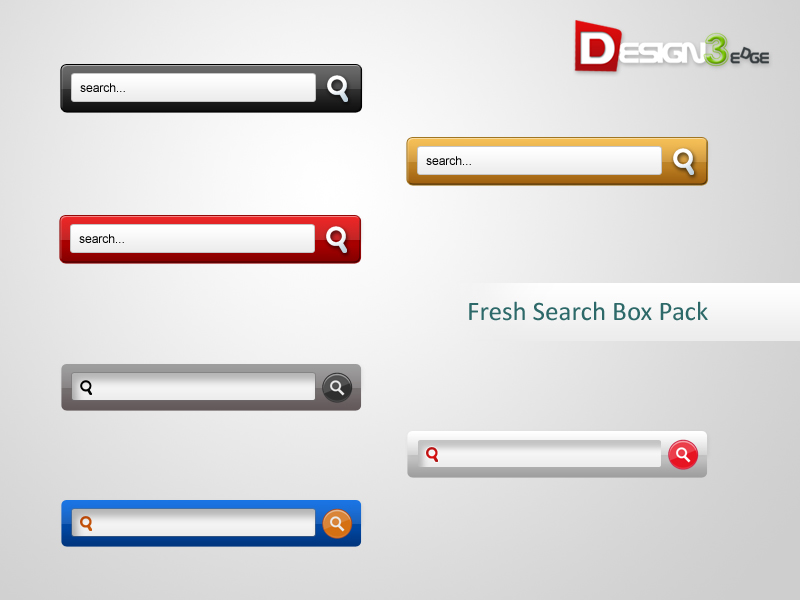
How to Add Beautiful Search Boxes to Blogger
- Login to Blogger Dashboard -> Design tab -> Page Elements .
- Click on Add a Gadget where you wish to place Search Box.
- Choose HTML/JavaScript from the List.
- Place any one Search Box code in to it and Save the Gadget.
Style 1

<style type="text/css">
#w2b-searchbox{background:url(http://lh5.googleusercontent.com/-Cm6Ya53Wj6g/TeixHY3LRDI/AAAAAAAAA6I/jJkMnJEN60s/way2blogging_searchbox1.png) no-repeat scroll center center transparent;width:307px;height:50px;disaply:block;}
form#w2b-searchform{display: block;padding: 10px 12px;margin:0;}
form#w2b-searchform #s{padding: 6px;margin:0;width: 235px;font-size:14px;vertical-align: top;border:none;background:transparent;}
form#w2b-searchform #sbutton{margin:0;padding:0;height:30px;width:30px;vertical-align: top;border:none;background:transparent;}
</style>
<div id="w2b-searchbox">
<form id="w2b-searchform" action="/search" method="get">
    <input type="text" id="s" name="q" value="Search..." onfocus='if (this.value == "Search...") {this.value = ""}' onblur='if (this.value == "") {this.value = "Search...";}'/>
    <input type="image" src="http://img1.blogblog.com/img/blank.gif" id="sbutton" />
</form>
</div>
Style 2

<style type="text/css">
#w2b-searchbox{background:url(http://lh3.googleusercontent.com/-bk2Si48eZSo/TeixHMdeiII/AAAAAAAAA6A/eQEEa1tyZkI/way2blogging_searchbox2.png) no-repeat scroll center center transparent;width:307px;height:50px;disaply:block;}
form#w2b-searchform{display: block;padding: 10px 12px;margin:0;}
form#w2b-searchform #s{padding: 6px;margin:0;width: 235px;font-size:14px;vertical-align: top;border:none;background:transparent;}
form#w2b-searchform #sbutton{margin:0;padding:0;height:30px;width:30px;vertical-align: top;border:none;background:transparent;}
</style>
<div id="w2b-searchbox">
<form id="w2b-searchform" action="/search" method="get">
    <input type="text" id="s" name="q" value="Search..." onfocus='if (this.value == "Search...") {this.value = ""}' onblur='if (this.value == "") {this.value = "Search...";}'/>
    <input type="image" src="http://img1.blogblog.com/img/blank.gif" id="sbutton" />
</form>
</div>
Style 3

<style type="text/css">
#w2b-searchbox{background:url(http://lh3.googleusercontent.com/-peHEeRB58M8/TeixHZml3oI/AAAAAAAAA6E/J2_zg9Fn8PI/way2blogging_searchbox3.png) no-repeat scroll center center transparent;width:307px;height:50px;disaply:block;}
form#w2b-searchform{display: block;padding: 10px 12px;margin:0;}
form#w2b-searchform #s{padding: 6px;margin:0;width: 235px;font-size:14px;vertical-align: top;border:none;background:transparent;}
form#w2b-searchform #sbutton{margin:0;padding:0;height:30px;width:30px;vertical-align: top;border:none;background:transparent;}
</style>
<div id="w2b-searchbox">
<form id="w2b-searchform" action="/search" method="get">
    <input type="text" id="s" name="q" value="Search..." onfocus='if (this.value == "Search...") {this.value = ""}' onblur='if (this.value == "") {this.value = "Search...";}'/>
    <input type="image" src="http://img1.blogblog.com/img/blank.gif" id="sbutton" />
</form>
</div>
Style 4

<style type="text/css">
#w2b-searchbox{background:url(http://lh4.googleusercontent.com/-Pd1zyUMhsVo/TeixHnaB1hI/AAAAAAAAA6M/p-Iz_WGMQ3M/way2blogging_searchbox4.png) no-repeat scroll center center transparent;width:307px;height:50px;disaply:block;}
form#w2b-searchform{display: block;padding: 12px;margin:0;}
form#w2b-searchform #s{padding: 6px 6px 6px 26px;margin:0;width: 215px;font-size:14px;vertical-align: top;border:none;background:transparent;}
form#w2b-searchform #sbutton{margin:0;padding:0;height:30px;width:30px;vertical-align: top;border:none;background:transparent;}
</style>
<div id="w2b-searchbox">
<form id="w2b-searchform" action="/search" method="get">
    <input type="text" id="s" name="q" value=""/>
    <input type="image" src="http://img1.blogblog.com/img/blank.gif" id="sbutton" />
</form>
</div>
Style 5

<style type="text/css">
#w2b-searchbox{background:url(http://lh6.googleusercontent.com/-wu3eH4N9D1Q/TeixH8dOd9I/AAAAAAAAA6Q/taoILP-y0vE/way2blogging_searchbox5.png) no-repeat scroll center center transparent;width:307px;height:50px;disaply:block;}
form#w2b-searchform{display: block;padding: 12px;margin:0;}
form#w2b-searchform #s{padding: 6px 6px 6px 26px;margin:0;width: 215px;font-size:14px;vertical-align: top;border:none;background:transparent;}
form#w2b-searchform #sbutton{margin:0;padding:0;height:30px;width:30px;vertical-align: top;border:none;background:transparent;}
</style>
<div id="w2b-searchbox">
<form id="w2b-searchform" action="/search" method="get">
    <input type="text" id="s" name="q" value=""/>
    <input type="image" src="http://img1.blogblog.com/img/blank.gif" id="sbutton" />
</form>
</div>
Style 6

<style type="text/css">
#w2b-searchbox{background:url(http://lh5.googleusercontent.com/-TN5qYaRnSR4/TeixH2TVJlI/AAAAAAAAA6U/gYrDmDItWJQ/way2blogging_searchbox6.png) no-repeat scroll center center transparent;width:307px;height:50px;disaply:block;}
form#w2b-searchform{display: block;padding: 12px;margin:0;}
form#w2b-searchform #s{padding: 6px 6px 6px 26px;margin:0;width: 215px;font-size:14px;vertical-align: top;border:none;background:transparent;}
form#w2b-searchform #sbutton{margin:0;padding:0;height:30px;width:30px;vertical-align: top;border:none;background:transparent;}
</style>
<div id="w2b-searchbox">
<form id="w2b-searchform" action="/search" method="get">
    <input type="text" id="s" name="q" value=""/>
    <input type="image" src="http://img1.blogblog.com/img/blank.gif" id="sbutton" />
</form>
</div>
Subscribe to Email Updates and Follow me on Twitter to receive Latest Updates form this Blog!

nice nice nice again nice ..:)
Awesome work again Harish !
Very nice search box Harish. You are awesome sir, the red search box just suited perfect for my site. I just want to ask though if there's a way for me to remove the padding whenever i click on the search box. I'd like to eliminate the yellow border in the search input. I tried changing the padding to 0px: but it destroys the positioning of the word "Search…"
Love the Red one! =)
Nice
Thanks!
hey bro can you convert www.apycom.com jqueries menu for blogger..plz
Hey dude! Thank you so much for this, you have taught me a great lesson today but listen… I use Blogger and one of the issues with search bars that I have is that when I look for something that has too many results, it loads them all but I want to reduce it to let's say 4 or 5 posts, any idea of how could I do this mate?
Thanks for the help!
@madetobenow
Yes! there is a way to limit the search Results
add below code just Before </form> tag in your search box
<input type="hidden" id="justnothing" name="max-results" value="10"/>
value 10 is max results to Show while search
you can change it also
thanks you, Good luck
Love this site..love all the posts
Is there any way to integrate adsense search with these awesome search box???
nice one dude. great on my site. http://makisale.blogspot.com
Cool!
dear
How ingress search result ..i mean I Post one and title "power" ..a visitor search "pow" ..and result show the power title post ….but my not show it …
how can any idea
I think this search result from bases of post cont.
how can make a search of the base POST TITLE
I placed this search on my site but only some words return a search result, others do not. Does this only search tag words and not the words in the headline or article? wouldntmind.com
Thank U So so Much <3
There is no gadget in blogger named html/java script.
Thanks, this works way better than the one blogger offers, perfect solution for my blog. is there a way to make the box smaller? thnx again.
@JEOMEX
Use Google Custom Search for better results.
Love this but they are too big for my sidebar. Any way to make them smaller? I tried playing with the widths and it just cut off parts of it. Thanks!
nice blog
I’d also like to make it smaller, is this possible?
Thanks
A
cool.. love the color
Adelle , you can resize it by editing the width in the first row at the style sction
Hi harish, i need ur help, i dont know what i did to my html codes, How do i make my feed display the blog post title and the post itself?
Currently it only displays the title:
hi nice design yaar!!
but i have a problem using this.. i did as you said here.. but the search box is bigger then the space blogger given for gadjets
when i tried to keep the px size smaller…
then it kinda crop the design as a cropped pic..and it doesn’t look search engine anymore..just two lines!!
help me how to make the size smaller in that script!
So simple yet so beautiful. I have used it on my site http://www.haplessgeek.com.
Thank.So beautiful but it’s not helpful.
hey nice work …. But it sometimes does not search for the related keyword…plz help
Blogger search engine didn’t support related keywords. it works with exact keywords
hi, i changed the image background for this search box, i did my own search box, but when i tried to search the search button is too far from the place where my search button is, how can i move or resize the search box?
here i am using it: http://madebyacatlover.blogspot.mx/
nice bro wanna try it now
terrific tool!
I love the search box, but how can I remove the yellow border that pops up when the form is selected?
add to css
:focus{outline:none;
}
Worked! Thanks so much. Your design is classy and fits perfectly with my site.
Thanks again!
Applied the gray one to my site, and It’s simply awesome!
Thanks heaps
Hello, i have a little question i added in the searchbox value”” some value to display in the searchbox, but how i make that this text erases if i click on the searchbox?
Hello I did the search bar and added it to my navigation menu and it appears on top instead of to the right side. Is there a way to fix this?
This widget is not confortable on navigation menu.
Hi can you help me with this? I cannot make it fit my navbar, it’s to down how to make it a little up?
ps. how to add such great comment area as yours?
nice widget is there a way to make it smaller to fit the template mines kinda pops out …the orange one rocks!
Hi! Can I customize the width to let it reach that of my side bar? how?
thanks a lot
Wow, i love the search box! Thank you so much harris
Done, & work in My Blog.. Thank’s