Add Animated Jquery Sliding Panel with Content Widget for Blogger
Hello Friends! Animated Jquery Sliding Panel with Content Widget for Blogger. this is a Plugin from Jquery and it was Developed by Jon Phillips and Plugin Developed by jQeasy. i am giving to Use on Blogger, Actually this widget Asked by one of Blogger, my Blog Reader and Follower. I done very hard work for making Widget Form for you, and it takes almost 1 1/2 day to analyze and Widget Form Creation. but it is very simple to use on your Blog. the main feature is we can Show any content in less space, more efficient and attractive animation effect when you click.
Live Demo :-
Click here! to See Live Demo
this is my second test blog i created to show a widget demo
this is my second test blog i created to show a widget demo
How to Add Jquery Slide Panel with Content
there are three steps
Step 1: Adding Jquery JavaScript Plugin
- Go to Blogger Dashboard -> Design tab -> Edit Html
- Search for
</head>tag - Add below line of code Before
</head>tag<script src="http://ajax.googleapis.com/ajax/libs/jquery/1.8.2/jquery.min.js" type="text/javascript"></script>
Step 2: Adding Jquery Slide Panel Plugin
You Must add this plugin.
- Search for
</head>tag - Add below line of code Before
</head>tag<script src="http://widgets.way2blogging.org/blogger-widgets/jquery.slidePanel.min.js" type="text/javascript"></script>
Step 3: Adding Jquery Slide Panel Widget Code
Here i am Giving Widget Code generator Form and i Include all possible Options with advanced CSS Styling. You can add multiple pannels.
Customize the Trigger CSS & Panel Content CSS Fields as you need.
Settings :
- First Click this Button
-
for Trigger Name and Panel Content please See the Image Below.
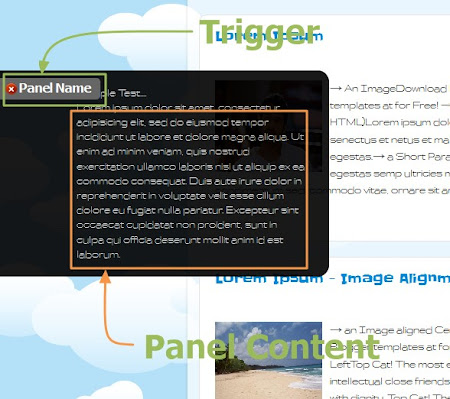
- Finally Generate Widget Code and Put it Before
</body>tag - and Save your Template
If you have any Difficulty then Leave a Comment
I hope you enjoyed this widget.
If you like the widget then feel free to share and leave a Comment.

HARISH SIR..!!
http://www.way2blogging.org/contact I WANT DIS FORUM IN DIS JQUARY SCRIPT…
IS IT POSSIBLE…
haha I know u r a magician
PLZ..
nope. i am using a WordPress plugin for contact forms. you can use any third-party contact forms.
Thank you Harish!
Sir..
i put that code in html widget … but now it is apearing ok…but not opening…
and if i put that code on tag…the templete..doesnt load…and got error..
Now what should em gonna do..
..
I have put a kontactr Form Code in Contant …
Plzzz Solve my problem
Hey ,..Bro Thanx For This…Widget…I solve all dose problems ..i mentioned in uppar comment…But Now i am facing the major problem that is….my slide show on website .. Is stoped workin … I want both of Things on ma blog…1 slide show and slide panel …plz Help
Bro …Mujhe pics Slider and This content slider ki bhot Zarurt h..
em goin to esteblish ma business on a small scale..
i need both things work togethr On This
plz check.. || www.demodemowe.blogspot.in ||
That will be a great help…
Agar dose both working togethr is not possible…
then plz tell me any another way …to put dose kind of stuff togethr…
in these both …1 chalta h to 1 band ho jata h.. jquery plugin htane or lagane se…
Please Try once again, there is a jQuery conflict with other plugins. i fixed in the code.
please generate and add new code.
THANXX ….THANXXXXX A TON////!!!!!!!!!!!!
I WILL CALL U GENIUS FOR NOW
Thanxx For a grat help …but bro in generator there is a option missin… Put unique numbers…:)
No, not required, at the time of posting this articles, there is a user option to add a unique number, so if you add this widget one or more times, it won’t conflicts.
After, I updated the generator, to add the unique number automatically. But i didn’t updated the article.
HaHa..k bro…tell me 1 more thing can we put adsense ad in this slider
if yes then how :O
nope. it’s against Adsense TOS. don’t try to play with Adsense.
will discover the poetics of adsense? eg http://www.plantillas-blogger-blogspot.com/ use it on my blog
This widget is not working on my this website but it’s working on my other blog. Please look to the website and tell me what is the problem
may be you already have a jquery plugin in your blog.
Cant Save Template Preview says “Your template could not be parsed as it is not well-formed. Please make sure that all XML elements are closed properly. XML error message: The content of elements must consist of well-formed character data or markup.
Error 500″ wat can i do
add as html widget in sidebar
I already add this code on my blog but not working