

Static follow by Email Widget is a New Widget for Blogger/Blogspot. This is Actually a WordPress Plugin. Now it is available for Blogger Blogs. This Widget is Jquery Based widget with Nice and smooth Popout effect. You will get more email subscribers with this widget and Very easy to Install in your Blog.
Look at Preview of this Widget. 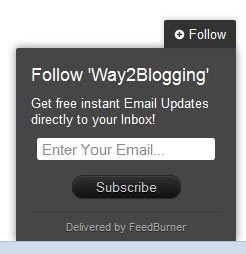
How to Install Pop out Follow by Email Widget?
As this widget based on jQuery plugin, First you need to have a jQuery Plugin in your Blog template.
This Step is Required, If your Blog already have this plugin then Ignore this Step.
If your Blog Don’t have this Plugin, Install the jQuery Plugin.
Add the below line of code before </head> tag.
<script src="https://ajax.googleapis.com/ajax/libs/jquery/1.8.2/jquery.min.js"></script>Installing Widget:-
In this Second Step, I am giving two ways to install this widget. Both will give the Same Effect.
- By Adding Widget Code to Template.
- Using Widget Generator.
By Adding Widget Code to Template
This will converts Follow By Email Official Blogger Widget to a Pop out follow by Email Widget.
- First Add Follow By Email Official Blogger Widget to Your Page Elements Layout.
- Add the Below Section Of code before closing
</head>tag.<style type="text/css"> /*<![CDATA[*/ .FollowByEmail {background-color: #464646;width: 220px;color: #fff;position: fixed;z-index: 999999;right: 10px;bottom: 0;} .followOpened {-webkit-border-radius: 2px 0 0;-moz-border-radius: 2px 0 0;border-radius: 2px 0 0;-webkit-box-shadow: 0 0 8px rgba(0, 0, 0, 0.5);-moz-box-shadow: 0 0 8px rgba(0, 0, 0, 0.5);box-shadow: 0 0 8px rgba(0, 0, 0, 0.5);} .w2bfollowButton {background: #464646;color: #CCC;font-size: 13px;line-height: 28px;padding: 0 10px;text-decoration: none;position: absolute;top: -28px;right: 0;display: block;-webkit-box-shadow: 0 -1px 5px rgba(0, 0, 0, 0.2);-moz-box-shadow: 0 -1px 5px rgba(0, 0, 0, 0.2);box-shadow: 0 -1px 5px rgba(0, 0, 0, 0.2);-webkit-border-radius: 2px 2px 0 0;-moz-border-radius: 2px 2px 0 0;border-radius: 2px 2px 0 0;height: 28px;} .w2bfollowButton span {background: url("http://4.bp.blogspot.com/-cojt7gQfz4Q/TztYuq2TltI/AAAAAAAABcE/OTwMxjnwak8/s1600/follow-w2b.png") no-repeat scroll 0 3px transparent;padding-left: 15px;} .w2bfollowButton:hover,.followActive {color: #fff !important;} .w2bfollowButton:hover span,.followActive span {background-position: 0 -37px !important;} .followactive {background-color: #333;} .follow-by-email-inner {padding: 15px;} .FollowByEmail h2 {padding: 15px 15px 0;font-size: 18px;margin: 0 0 10px;font-weight: normal;} .follow-by-email-inner p {margin: 0 0 10px;} .follow-by-email-inner .follow-by-email-address {width: 95%;padding: 2px 4px;margin: 0 auto;-webkit-border-radius: 3px;-moz-border-radius: 3px;border-radius: 3px;font-size: 15px;border: 1px solid #444;color: #888;display: block;clear: both;} .follow-by-email-inner form {text-align: center;} .follow-by-email-inner td{display: inline-block;width:100%;text-align:center;} .follow-by-email-inner .follow-by-email-address:focus {color: #000;border-color: #000;} .follow-by-email-inner .follow-by-email-submit {cursor: pointer;padding: 2px 20px;background: #333;background: -webkit-linear-gradient(top, #333 0%, #111 100%);background: -moz-linear-gradient(top, #333 0%, #111 100%);background: -o-linear-gradient(top, #333 0%, #111 100%);background: -ms-linear-gradient(top, #333 0%, #111 100%);background: linear-gradient(top, #333 0%, #111 100%);color: #ccc;text-shadow: 0 1px 0 #000;border: 1px solid #282828;-webkit-border-radius: 11px;-moz-border-radius: 11px;border-radius: 11px;-webkit-box-shadow: inset 0 1px 0 #444;-moz-box-shadow: inset 0 1px 0 #444;box-shadow: inset 0 1px 0 #444;text-decoration: none;-webkit-transition: all 0.25s ease-in-out;-moz-transition: all 0.25s ease-in-out;-o-transition: all 0.25s ease-in-out;-ms-transition: all 0.25s ease-in-out;transition: all 0.25s ease-in-out;margin: 1em 0 1em 0;} .follow-by-email-submit:hover {background: #222;background: -webkit-linear-gradient(top, #333 0%, #222 100%);background: -moz-linear-gradient(top, #333 0%, #222 100%);background: -o-linear-gradient(top, #333 0%, #222 100%);background: -ms-linear-gradient(top, #333 0%, #222 100%);background: linear-gradient(top, #333 0%, #222 100%);color: #fff;-webkit-box-shadow: inset 0 1px 0 #4f4f4f;-moz-box-shadow: inset 0 1px 0 #4f4f4f;box-shadow: inset 0 1px 0 #4f4f4f;text-decoration: none;} .follow-by-email-submit:active {background: #111;background: -webkit-linear-gradient(top, #111 0%, #222 100%);background: -moz-linear-gradient(top, #111 0%, #222 100%);background: -o-linear-gradient(top, #111 0%, #222 100%);background: -ms-linear-gradient(top, #111 0%, #222 100%);background: linear-gradient(top, #111 0%, #222 100%);color: #aaa;-webkit-box-shadow: inset 0 -1px 0 #333;-moz-box-shadow: inset 0 -1px 0 #333;box-shadow: inset 0 -1px 0 #333;text-decoration: none;} .w2bFollowFooter {text-align: center;font: normal 11px "Helvetica Neue", sans-serif;padding: 7px 0;margin: 0 0 -15px !important;border-top: 1px solid #3c3c3c;} .w2bFollowFooter a {color: #aaa;text-shadow: 0 1px 0 #262626;background: none;text-decoration: none;} .w2bFollowFooter a:hover {color: #fff;background: none;} /*]]>*/ </style> <script type="text/javascript"> /*<![CDATA[*/ ;(function(w2b){w2b(document).ready(function(){w2b.extend(w2b.easing,{easeOutCubic:function(x,t,b,c,d){return c*((t=t/d-1)*t*t+1)+b}});var followBox=w2b(".FollowByEmail");followBox.prepend("<a class="w2bfollowButton" href="#"><span>Follow</span></a>");w2b("<p></p>",{class:"w2bFollowFooter",html:"<a href="http://feedburner.google.com" target="_blank">Delivered by FeedBurner</a>"}).appendTo(followBox.find(".follow-by-email-inner"));followBox.find("td:last").removeAttr("width");var followHeight="-"+followBox.outerHeight()+"px";followBox.hide().css({bottom:"-500px"});setTimeout(function(){followBox.show().animate({bottom:followHeight})},500);w2b(".w2bfollowButton").click(function(e){if(followBox.hasClass("followOpened")){w2b(this).removeClass("followActive");followBox.removeClass("followOpened").animate({bottom:followHeight},{duration:200,easing:"easeOutCubic"})}else{w2b(this).addClass("followActive");followBox.addClass("followOpened").animate({bottom:"0"},{duration:400,easing:"easeOutCubic"})}e.preventDefault()})})})(jQuery); /*]]>*/ </script> - Save the Template!
Using Widget Generator
- Click this below Button .
Widget Generator - Must Fill the Feedburner ID.
Ex:-
My Feedbuner URL ishttp://feeds.feedburner.com/way2blogging
My Feedbuner ID isway2blogging - Customize the Settings as you need.
- Add the Widget to Your Blog and Enjoy!
Any Feature Request or Suggestions are welcome. Feel free to share this widget and leave your comments. 


Its Awesome Man!!
Good Work
check my website it looks owsome
thanks
Really useful widget indeed
That’s similar with WordPress. Thank you very much.
great post bro keep going
5Stars

Really Great Work Bro…
Lot of Chances To Get New Subscribers
thanks for sharing this widget…
please make css3 and html5 templates for us…. for blogger users….
Would be helpful if you had a live demo.
Nice Widget Thanks for share this
awesome buddy, really useful.. Thanks for the share…
Thanks for the article
how to change to position, lets say on the upper right or upper left…
Install this new version http://www.way2blogging.org/2012/03/new-facebook-popout-likebox-version-2-for-blogger.html
How do I change the color of the “Follow” text? It can barely be seen against my background…
its really amazing, thanks for sharing.
Hi Harish and thank you for sharing this! Can you tell me plz how to place this widget to the right or left side? Like the spot that you have your facebook widget! I’m using the wibiya bar (at the bottom) and i can barely see the widget. Please help!
sorry! this Widget has one option only.
Mantab… lgsng jadi..
thanks, its very cute
Tanks for the guide on how to add Facebook share button into my site.
Hi Harish
thank you for this widget
thanks for info,.. i got more tips here
all the info in this blog is very useful, I would often come here to see the new tricks.
thanks for sharing …
Thanks Harish. Added to my blog
widget generator is not working in all posts .in your web site please fix itnnwww.alphagen.blogspot.com
working fine for me, can you please spot which is not working ?
Its not working for me. I have added the code via widget generator. But my blog still does not display the pop up.
jQuery Conflicts. don’t include jquery plugin with this widget
Not working help check mine.
It is Awesome Man..
Good Work